
Chat-Based AI vs Agentic AI (side by side comparison)
Nick and I walked through this in our free Maven Lightning Lesson, Use Claude Code as a Non-Technical Pro. For the full arc with demos, start there. This post is the short version: how chat-based AI tends to feel in daily use, what changes when you go agentic, and how to spot which mode you are in.
Chat-based AI vs. Agentic AI comparison
Here's a comparison between Chat-based AI and Agentic AI so you see the differences. One side is the chat apps you already use. The other is the setup where the model can react when work shows up and leave traces in Gmail, Slack, files on disk, and the rest. The slide below is the version from the lesson. Skim it once, then read on for examples.
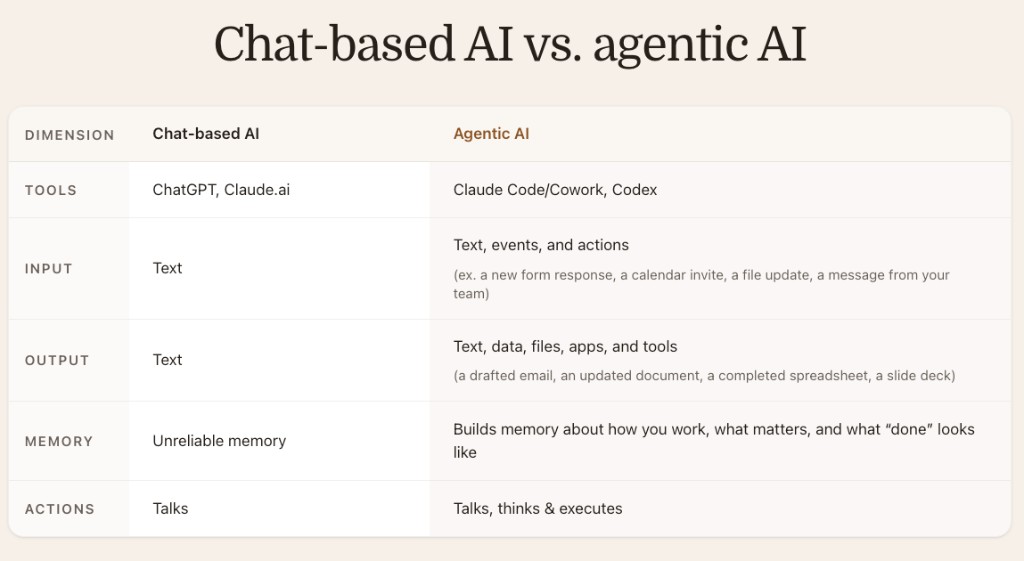
Chat-based tools are products like ChatGPT and Claude.ai: one surface built for back-and-forth messages. Agentic work usually lives in Claude Code, Claude Cowork, Codex-style CLIs, or custom agents where the expectation is that the model drives software, not only fills a thread.
Input differs too. Chat-based AI mostly waits on text you type, plus whatever you paste or upload in that session. Agentic setups also ingest events: a form submission, a calendar invite, a file that changed, a ping from a teammate. A run can start because something happened outside the chat window.
Outputs follow from that. Chat-based output is mostly text you still have to move by hand. Agentic output is text plus artifacts: staged email, updated doc or sheet, deck as a file or link, tool calls that already touched a system.
Memory is another split. Chat threads are easy to lose or pollute between sessions. Agentic setups tend to accrue memory the dull way: files, logs, preferences, repeat runs that teach the system what "done" looks like for you.
Actions are the clearest line. Chat-based AI talks. Agentic AI talks, plans, and executes, with you still drawing the line on what may ship without a human yes.
Chat-based AI example
The next two slides use the same sales follow-up story: you just finished a prospect call. You need a follow-up email, clean notes, CRM updates, tasks, and a Slack update so nothing stalls in a private draft.
Chat-based path (you are the glue)
- Copy the call transcript out of your notes tool.
- Paste it into ChatGPT or Claude and write a long prompt for summary, email, action items, and tone.
- Let the model draft, then copy the email into Gmail, fix tone and facts, update Salesforce by hand, rewrite tasks on your list, and Slack the team with takeaways.
The slide below is that path in one frame. On the left is the manual loop spelled out. On the right is a stylized ChatGPT-style thread. That panel is basically me in chat-only mode.
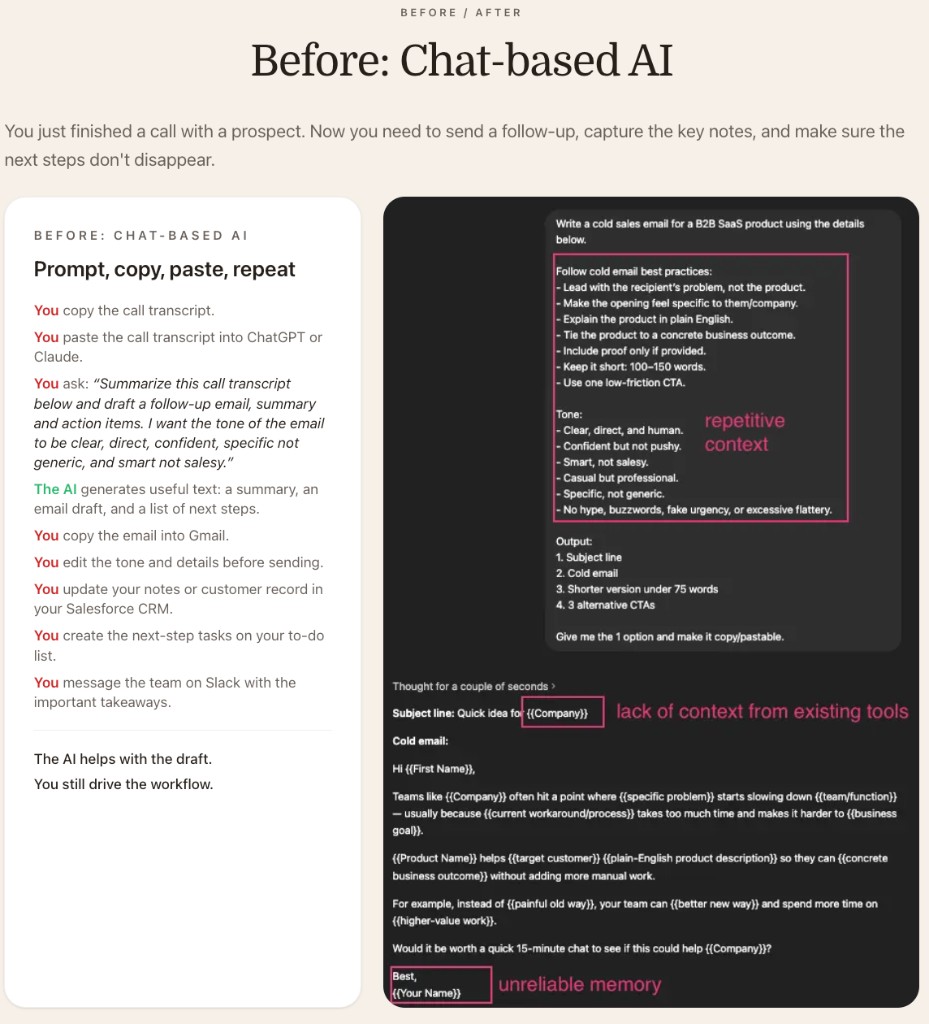
Three callouts in that mockup map to real friction, not just slide decoration.
Repetitive context: I paste the same tone rules, structure preferences, and "do not sound salesy" notes at the top of every new chat because the session does not carry my operating manual unless I drag it back in.
No live tie to my stack: the draft comes back with {{Company}}, {{First Name}}, and other blanks because the window cannot see Salesforce, my inbox, or the transcript record I care about. I become human middleware.
Shaky memory for identity and defaults: even how I sign emails can vanish between chats, so the model falls back to placeholders like {{Your Name}} unless I spell it out again.
That is the heart of it. Chat-based AI is a strong writer in a box. You are the integration layer.
Agentic AI example
Same sales follow-up as the ChatGPT slide above. Agentic AI keeps you responsible for outcomes, but it stops making you play courier between apps.
Agentic path (supervised execution)
- Issue one goal-level command, for example: "Prepare the follow-up from the Granola call, use
TONE.md, stage the Gmail draft, update Salesforce, post to#sales." - Let the agent run the cross-app steps and surface a review link or thread.
- Review, tweak, and approve the parts that need a human, especially outbound email.
The left column on the slide below is that story in green text: read the transcript, draft in Gmail with your tone file, update Salesforce, post to Slack, suggest next tasks. Your job is JUST to review, edit and approve. The agent does everything else! Amazing.
The right side of the slide is a real agent we shipped for a business. When an email lands, the agent can draft a reply with full thread context. In this thread the agent (shown as Soli2) posted a full response about lead times and MOQs, asked for approval, and when Nick replied with a short approve, send, it sent the email and confirmed "Approved and sent." Our human step was one sentence in Slack, not another lap through Gmail and the CRM.
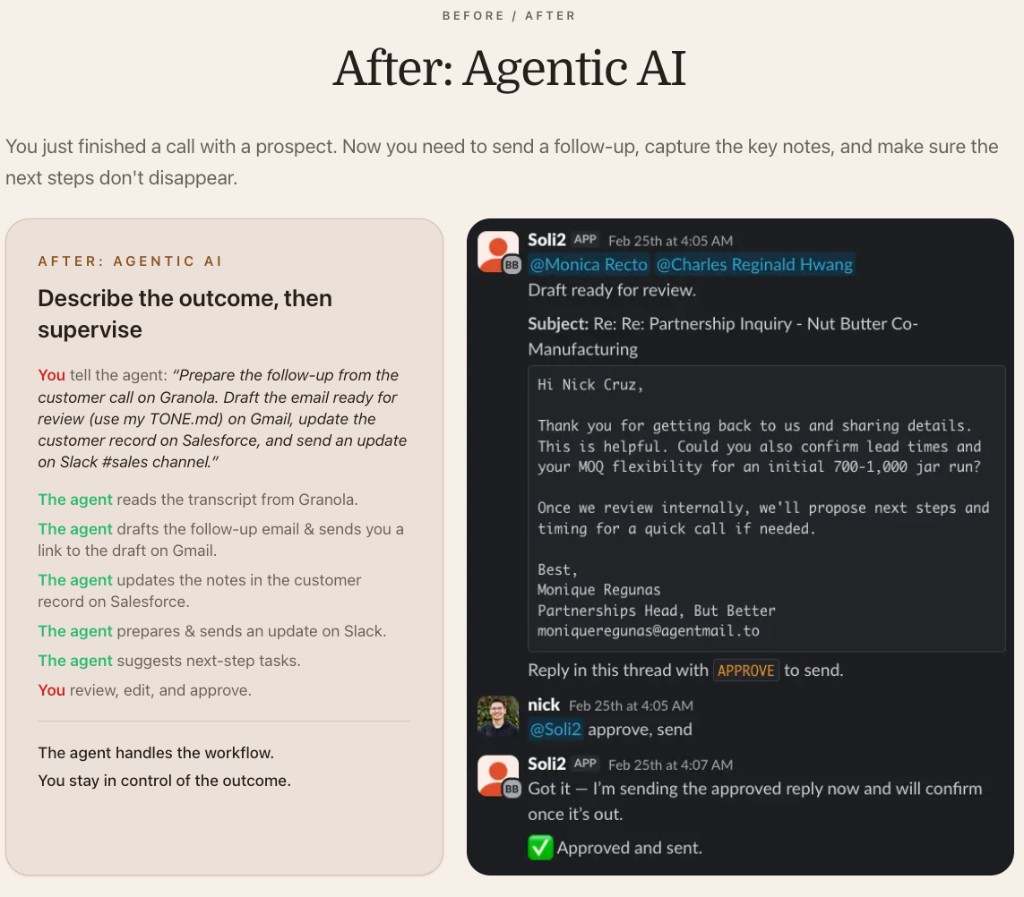
Same goal as the chat-based path. Less of you acting as copy-paste infrastructure. The agent carries the workflow. You stay in charge of the outcome, especially anything customer-facing, and you still own guardrails on what sends.
Here are some related guides to check out: