
Claude Tag for Slack
Your team already lives in Slack. But every time someone needs AI help, they open a separate tab, paste context from three channels, and hope the answer still makes sense by the time they copy it back. Claude Tag changes that. Anthropic just turned @Claude into a teammate inside Slack: one shared assistant per channel, with memory, tools, and the ability to work on tasks while you do something else.
Why this matters
At Anthropic, tagging @Claude is now one of the main ways work gets done. Their product team says 65% of their code comes from an internal version of Claude Tag. That pattern is spreading beyond engineering: people tag Claude to pull product metrics, work through support tickets, and chase down bugs. If you are on Claude Team or Enterprise, you can start testing this in beta now. Even if you are not an admin, it is worth understanding how it works so you know what to ask for.
Key insight: Claude Tag is not another chat window. It is a shared teammate that remembers your channel, uses your tools, and can keep working after you close the tab.
What Claude Tag actually is
Claude Tag lets @Claude join your Slack workspace as a team member. Admins choose which channels Claude can access and which tools or data sources it can use. Anyone in those channels can tag @Claude with a request in plain language. Claude breaks the task into steps, works through them with its connected tools, and replies in a thread when it is done.
If you have used Claude Code or Cowork, the feel is familiar. The difference is where it lives and who can see it.
The four things that make it different
1. @Claude is multiplayer
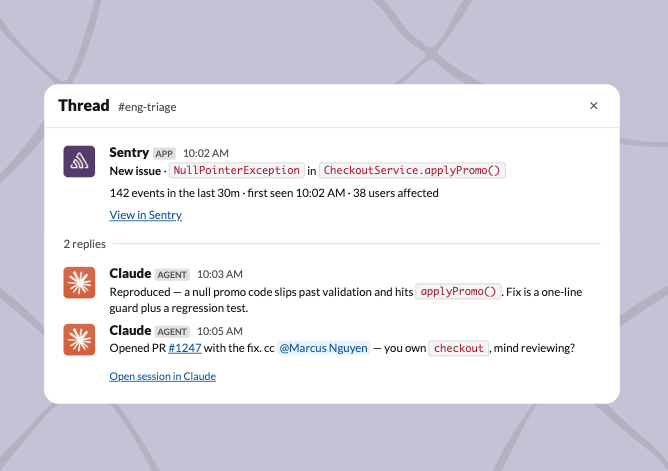
There is one Claude per channel, shared by everyone. Anyone can see what it is working on and pick up the conversation where someone else left off. That makes it closer to delegating to a teammate than opening a private chat for a one-off task.
2. @Claude learns over time
Claude builds context from the channels it is in. You do not have to re-explain your product, your customers, or your internal jargon every time. With permission, it can also learn from other Slack channels and connected data sources. It does not report from private channels it was not granted access to.
3. @Claude can take initiative
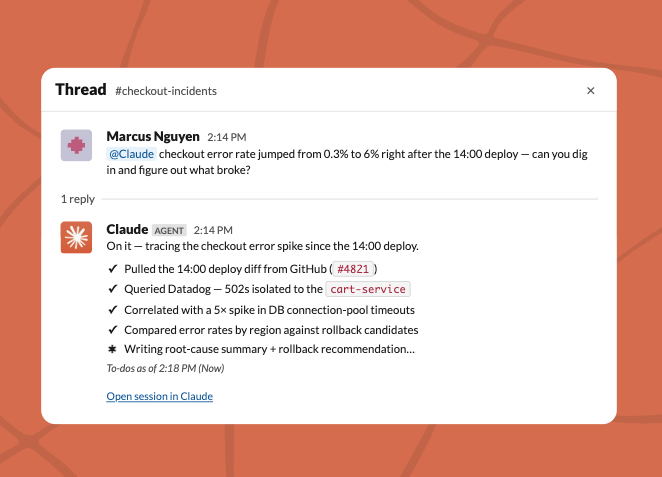
With "ambient" behavior turned on, Claude proactively surfaces information it thinks you need: relevant updates from connected channels and tools, or follow-ups on threads that went quiet without a resolution.
4. @Claude works asynchronously
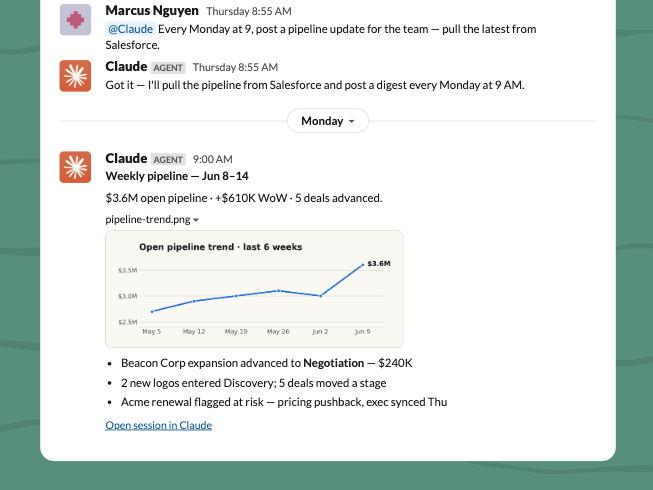
Tag it with a task and move on. Claude can schedule work for itself and pursue a project over hours or days. Anthropic's teams now run many Claudes in parallel instead of babysitting one chat at a time.
You can also DM Claude for private work. DMs use your personal tools and connectors, separate from the shared channel setup.
Getting started (for admins)
Claude Tag is built for teams with tight controls. Think of it as separate Claude identities per use case: a sales Claude does not share memories with an engineering Claude, and engineers do not get access to sales data.
You need Claude Enterprise or Claude Team (10+ paid seats). Claude Tag is in beta and replaces the older Claude in Slack app. Admins have 30 days to migrate. Eligible organizations get an introductory launch credit so the whole company can try it.
Step 1: Pair Claude Tag with your Slack workspace
Start at Anthropic's Claude Tag setup page and connect your workspace. This is the admin-only step that brings @Claude into Slack as a proper team member.
Step 2: Give Claude access to your tools
Choose which tools, data sources, and codebases each channel's Claude can use. Scope access narrowly at first. A support channel might get your help desk and docs. An engineering channel might get GitHub and internal runbooks. Sales stays separate from engineering.
Step 3: Set spend limits
Admins can cap token spend at the organization level and per channel. You can also view a full log of what @Claude did and who requested each task. Set limits before you open it to the whole company.
Step 4: Test in a private channel
Before rolling out widely, spin up a private channel, add @Claude, and run a few real tasks. Confirm tool access, memory behavior, and spend tracking work the way you expect.
Claude Tag runs on Opus 4.8. Full docs and the product page are on Anthropic's site.
How to use @Claude once it is live (for everyone)
Step 5: Tag @Claude like you would a sharp teammate
Write the request in simple terms. Say what you need, what "done" looks like, and any constraints. Claude will plan the steps and work through them with the tools it has.
Example: "@Claude pull last week's signup numbers from our analytics connector and summarize what changed vs. the week before."
Step 6: Keep the work in the thread
Replies land in a Slack thread. That thread becomes the record everyone on the channel can follow. If someone else needs to jump in, they read the thread and continue from there.
Step 7: Use channels for team work, DMs for personal work
Channel @Claude is shared, scoped, and visible to the team. DMs are private and billed to your individual seat, not the organization's channel credit. Use channels for metrics, tickets, and cross-functional tasks. Use DMs for drafts, personal research, or anything you do not want in a shared channel.
Step 8: Let ambient mode do the watching
If your admin enabled ambient behavior, you do not have to tag Claude for every update. It can flag relevant information and nudge stale threads on its own. Worth turning on in high-signal channels where dropped balls are expensive.
Step 9: Delegate and walk away
The biggest shift is treating @Claude like async work, not live chat. Set the task, set expectations on output, and let it run. Come back to the thread when you get the notification.
About the launch credit
Eligible Enterprise and Team organizations (10+ paid seats, active subscription, not on a free Enterprise trial) receive a shared organizational credit automatically. No claim form.
Covered: Claude Tag usage in public and private Slack channels.
Not covered: Slack DMs with Claude, plus Claude Code, Cowork, chat, or API usage.
Channel usage draws from the credit first. After it runs out, normal billing applies. The credit does not show as a line item on your invoice. Credits expire September 1, 2026 at 11:59 PM Pacific.
Additional reading
Here are some related guides to check out: