
Daily Briefing

Co-founder at King’s Cross Labs · ex-LinkedIn PM & Forbes 30 Under 30
Every morning, before I open my email or check Slack, Claude has already scanned my calendar, my inbox, my to-do list, and my meeting notes. It puts together a prioritized plan for my day before I even sit down. I didn't build anything complicated. I wrote a skill, connected a few tools, and scheduled it to run automatically.
Why this matters
Most people start their day reactive. They open their inbox and let whatever is loudest win. The daily briefing flips that. Because it reads my weekly goals first, it surfaces what actually matters, not just what feels urgent. This is one of the first things I'd recommend to anyone getting started with Claude or Claude Cowork. The payoff is immediate. You feel it on day one.
Step 1: Connect the tools you already use
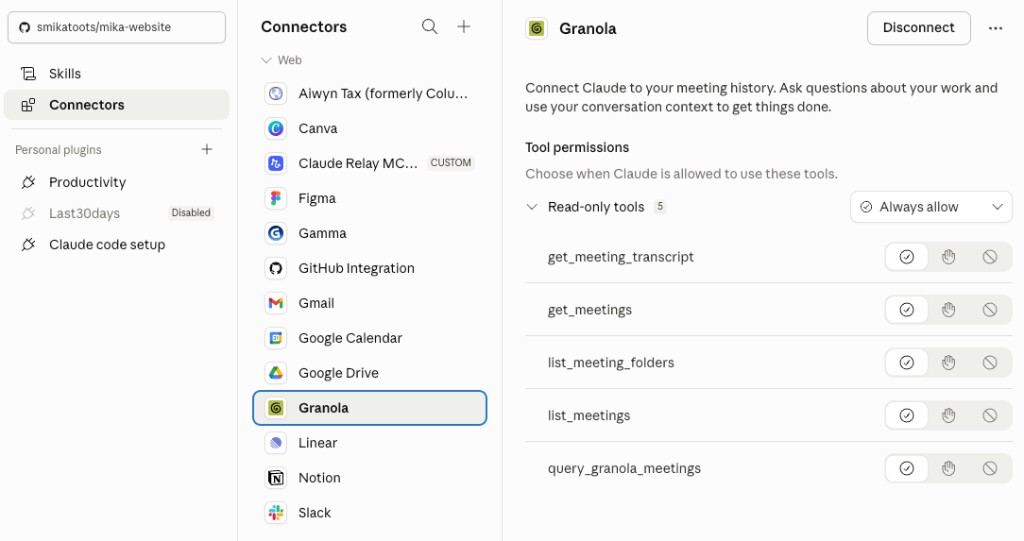
Claude needs to see your world before it can help you navigate it. The tools I have connected are Google Calendar, my email, Linear (my task tracker), Notion (where I keep my goals and notes), and Granola (where my meeting notes live).
You don't need all of these. Start with your calendar and one task manager. That alone gives Claude enough to work with.
Step 2: Write your weekly goals somewhere Claude can see them
The briefing only works well if Claude knows what you're trying to accomplish that week. I write my goals every Sunday in what I call my weekly ceremony, a structured reflection and planning ritual I run as its own skill. Claude reads those notes at the start of every briefing.
If you don't have a weekly ritual yet, a simple Notion page or a note in your task manager works. The key is writing it somewhere Claude is connected to.
Step 3: Write the daily briefing prompt
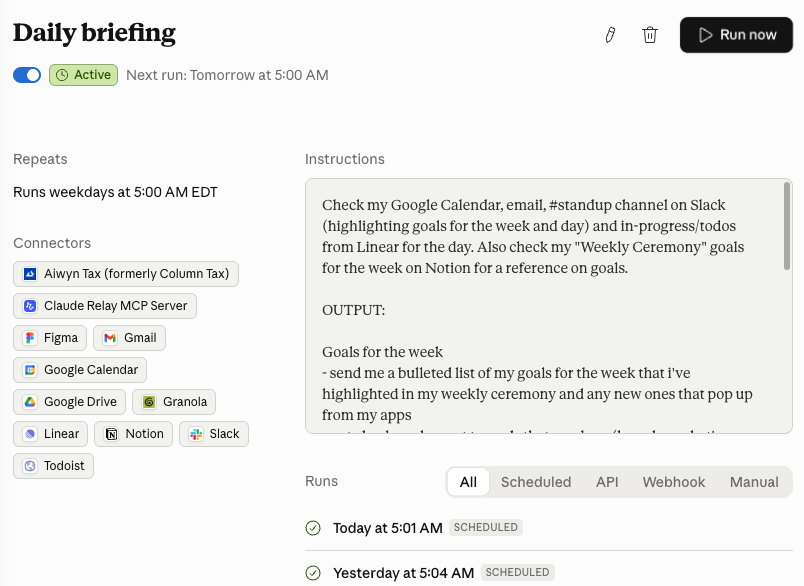
This is the actual skill, the prompt you give Claude that tells it what to do. Mine instructs it to look at today's calendar events, scan my email for anything urgent or time-sensitive, check my open tasks in Linear, review my meeting notes from yesterday, read my goals for the week, and then give me a prioritized list of what to focus on today plus anything that looks like it's falling through the cracks.
The output comes back as a short, structured briefing. Not a wall of text.
Copy/paste this prompt into Claude and ask it to create a scheduled task for you daily. You can also use /schedule with the prompt.
Please turn this into a scheduled skill and tasks that runs everyday at 9am.

---
name: daily-briefing
description: summarize my calendar, inbox and todos for the day
---

Check my Google Calendar, email, #standup channel on Slack (highlighting goals for the week and day) and in-progress/todos from Linear for the day. Also check my "Weekly Ceremony" goals for the week on Notion for a reference on goals.

Give me a bulleted list of my commitments for the day ordered in chronological order of time and if no time, then just listed. And also tell me what I should prioritize or what might be missing given the goals I set.
Key insight: The prompt is the product. Spending 30 minutes writing a great daily briefing prompt is worth more than any app subscription you'll ever buy.
Step 4: Schedule it to run automatically
I don't manually trigger this every morning. I set it up as a scheduled task so it runs on its own and the output is waiting for me when I wake up.
In Claude Cowork, you can create scheduled tasks that run on a recurring schedule. Set yours for early morning, before you'd normally start your day.
Step 5: Read it before you open anything else
This is the habit that makes the whole thing work. The briefing is only useful if you read it before you go reactive. I look at it before I open email or Slack. It takes two minutes to read and sets the frame for the rest of my day.
Where to start
If you're new to Claude Cowork, start with steps 1, 2, and 3. Get one integration connected (just your calendar), write down your goals for the week somewhere, and write a simple version of the briefing prompt. Don't wait until everything is set up perfectly.
If you're already using Claude but haven't scheduled anything yet, start with steps 3 and 4. You likely already have the tools connected. Write the prompt and schedule it. That's what turns this from a manual habit into an automated one.
If you already have a morning routine, start with step 5. The hardest part isn't the setup. It's protecting the habit of reading the briefing before you go reactive. Start there.
Additional Reading
Here are some related guides to check out:
Frequently asked questions
- How do I get Claude to give me a morning briefing?
- Connect the tools Claude needs to see your day (calendar, email, a task manager, and wherever your notes and goals live), then write a prompt that has it scan those plus your weekly goals and return a short prioritized plan. Schedule it to run automatically early each morning so the briefing is waiting when you wake up. Start with just your calendar and one task manager; that's enough to be useful.
- Why is an AI daily briefing better than just checking my inbox?
- Because it flips you from reactive to intentional. Instead of letting whatever's loudest in your inbox win, the briefing reads your weekly goals first and surfaces what actually matters plus anything falling through the cracks. It sets the frame for your day in a two-minute read. The habit that makes it work is reading it before you open email or Slack.
- Do I need a lot of tools connected for a daily briefing to work?
- No, you don't need the full stack. Start with your calendar and one task manager, and write your weekly goals somewhere Claude is connected to, like a simple Notion page. That alone gives Claude enough to build a useful prioritized plan; you can add email, meeting notes, and Slack later.