
How Anthropic's Account Executive Preps Sales Calls with Claude Cowork

Co-founder at King’s Cross Labs · ex-LinkedIn PM & Forbes 30 Under 30
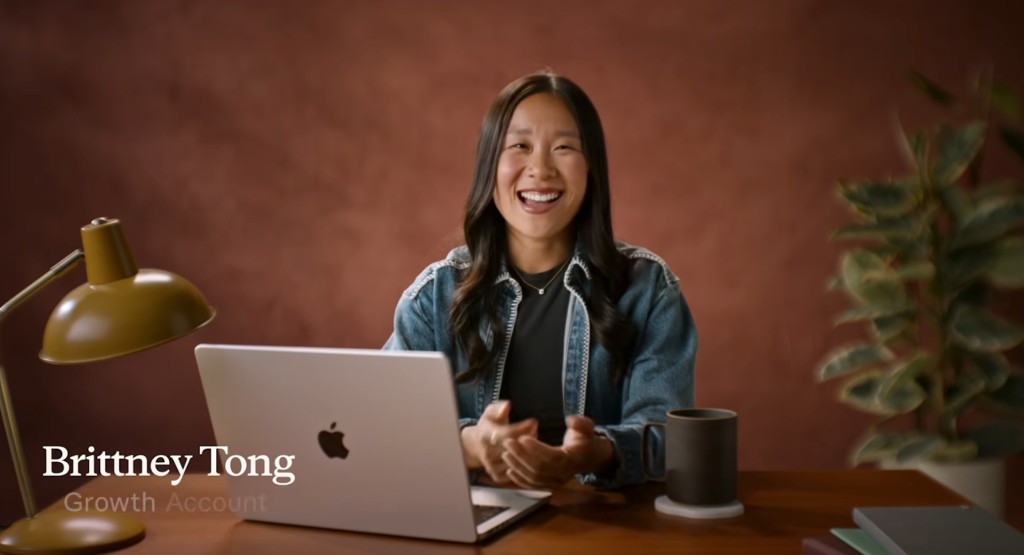
Anthropic just posted how Brittney Tong preps for customer calls with Claude Cowork. Brittney is a Growth Account Executive who manages some of their most strategic startup accounts. Before every first customer call, she needs to know who they are, what they're building, how they're using Claude, what they're spending, and where the risks and growth opportunities sit. That information lives in Salesforce, a data warehouse, call recordings, Slack, email, and the web. Pulling it together used to take hours. Now she does it in minutes with two Claude Cowork skills.
Why this matters
If you sell anything complex, you know the feeling. You have a call in 30 minutes and you're tab-hopping between your CRM, Slack threads, old emails, and Google. You walk in asking basic questions instead of having a real conversation. Brittney flipped that. She built two skills: one that assembles a full account brief before the meeting, and one that turns the call transcript into action items, an internal debrief, and a customer follow-up after. The whole post-meeting flow that used to take 30 minutes now takes a couple. And it's more thorough than what she'd write from memory.
Key insight: The best sales prep isn't more research. It's research that runs itself while you focus on the relationship.
Set up once: connectors and skills
You don't need to be technical to build this. Brittney started by opening a Cowork session and describing what she'd want to know walking into a meeting. Claude drafted a skill file from that conversation. A skill is basically a plain-text file that tells Claude which data sources to check, what signals matter, and how to format the output. She can open it anytime and verify exactly what it's doing.
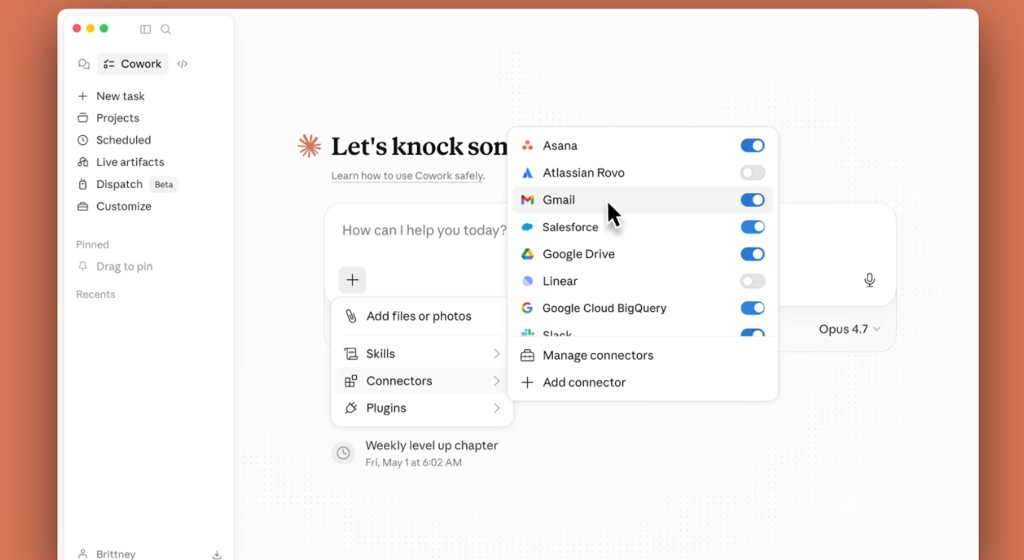
Step 1: Connect the tools where your account data actually lives.
Open Claude Cowork and connect whatever holds your customer context. Brittney has her data warehouse, Salesforce, Gmail, Google Drive, Slack, and web search turned on. You might swap in HubSpot, Notion, Gong, or a spreadsheet export. The point is giving Claude permission to read the same places you'd dig through manually.
Step 2: Pick a folder Claude can read and write to.
Choose a local folder on your desktop where Claude can save strategy docs and pull files when needed. Brittney keeps account briefs organized there so every prep session starts from the same place.
Step 3: Describe your ideal pre-meeting brief and let Claude draft the skill.
Tell Claude what you'd want to know before a first call. Account tier, spend trends, stakeholder map, open deals, product usage, competitive risks, recent news. Ask it to turn that into a reusable skill file with clear data sources and output sections. Run it on a test account, read the output, and refine the skill in plain English until it matches how you actually think about accounts.
Step 4: Build a second skill for post-meeting debriefs.
Same process, different job. Describe what you need after a call: your personal action items, an internal Slack summary with owners assigned, and a customer follow-up draft. Claude drafts the skill. You test it on a real transcript and tweak until the format sticks.
Workflow 1: Account Strategy Builder (pre-meeting)
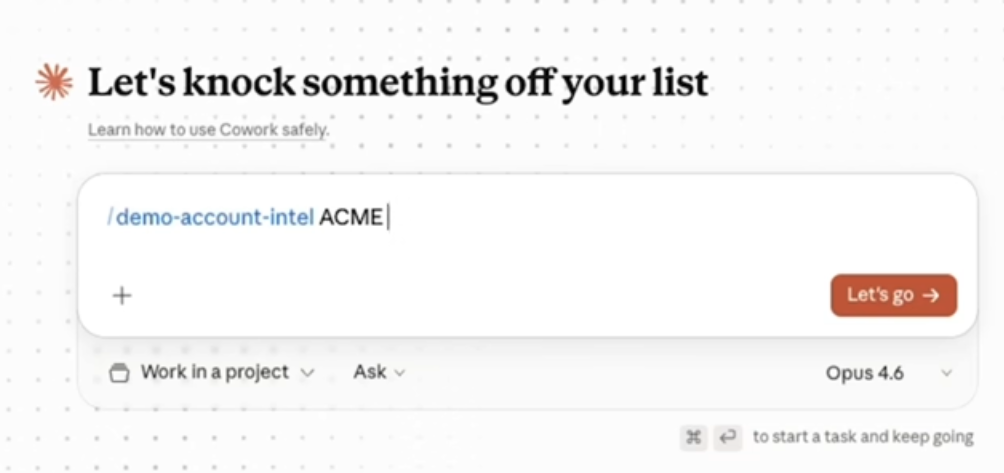
Brittney has a first call tomorrow. She opens Cowork, types slash, picks her Account Strategy Builder skill, and names the account. That's it.
Step 5: Let Claude pull from every source at once.
Once you hit go, Claude runs the data pulls in parallel. For Brittney, that means call recordings from the last 90 days, revenue trends from the warehouse, open opportunities in Salesforce, relevant email and calendar activity, Slack context, and funding or news from the web. You'd see a progress checklist updating in real time as each source completes.
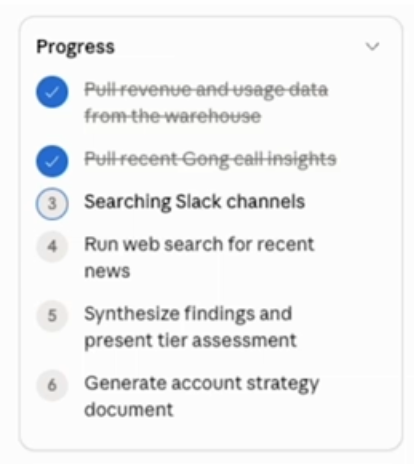
Step 6: Review the synthesized account assessment.
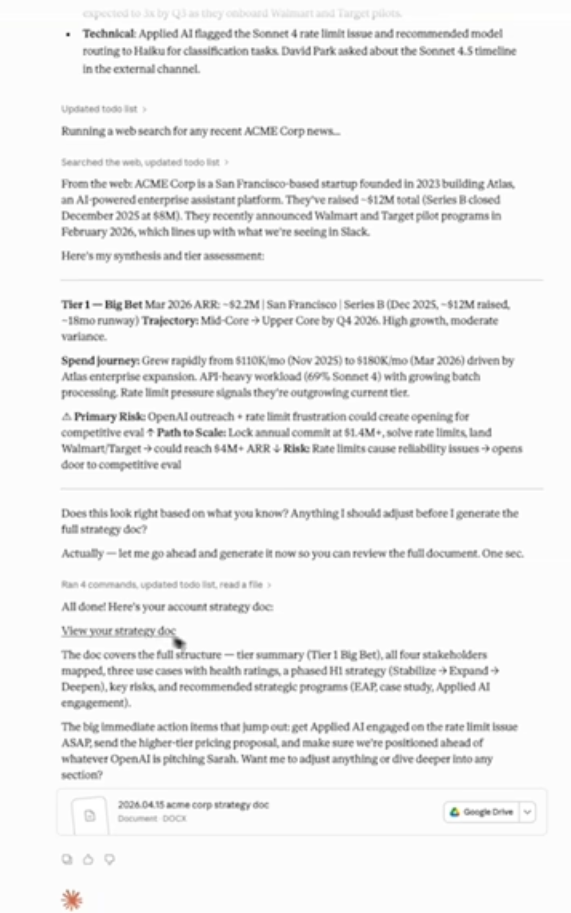
Before it writes the full doc, Claude presents a tier assessment with the highlights: ARR, growth trajectory, spend journey, product usage patterns, and primary risks. Brittney reads this first to sanity-check whether Claude got the story right.
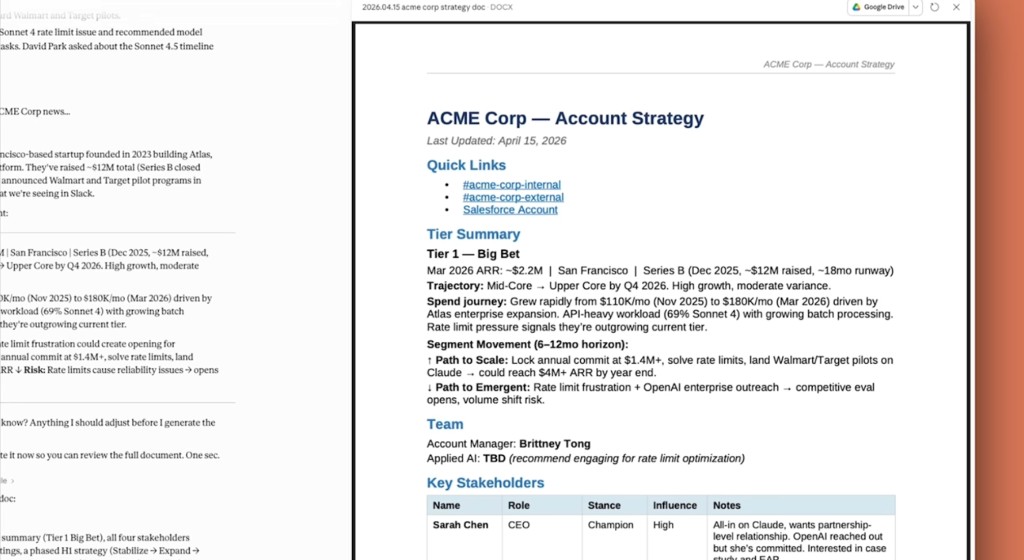
Step 7: Open the full strategy document.
Claude generates a complete account brief and saves it to your folder. Brittney's output includes stakeholder mapping with stance and influence levels, use case health ratings, risk watchpoints, and a phased strategy. She can also push the doc to Google Drive.
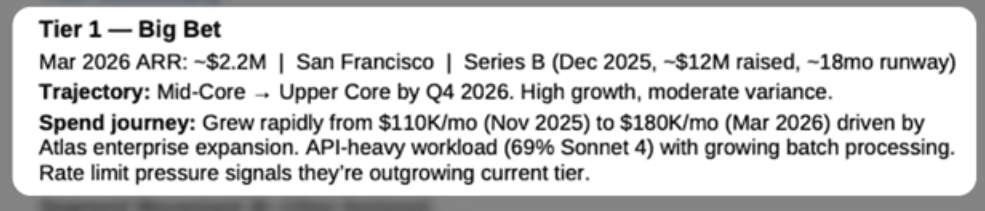
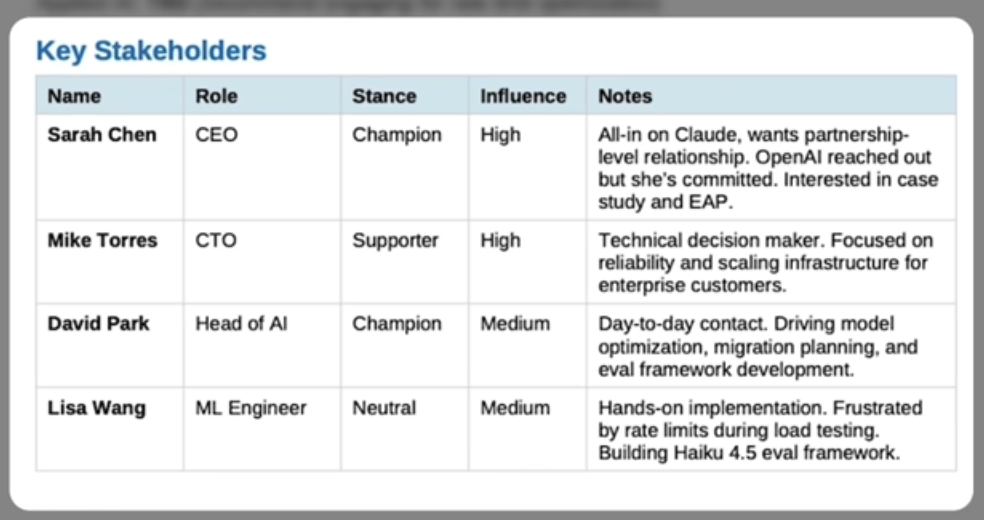
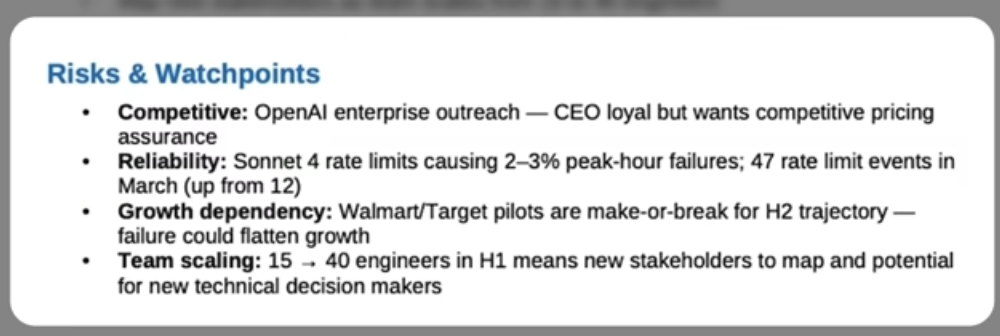
Now she walks into the call with real context. Instead of spending the first 20 minutes getting oriented, she opens with strategy. First impression counts.
Starter prompt: Account Strategy Builder
Paste this into Claude Cowork. Update anything in brackets to match your stack, then ask Claude to turn it into a skill.
Please turn this into a reusable Cowork skill called "[account-strategy-builder]".

When I provide an account name, do the following:

1. Pull from connected sources:
   - CRM [Salesforce / HubSpot / your CRM]: account tier, open opportunities, last activity, assigned contacts
   - Analytics [BigQuery / your data warehouse / spreadsheet export]: revenue and spend trends (last [90] days)
   - Call recordings [Gong / Chorus / your call recording tool]: key themes from calls in the last [90] days
   - Email and calendar [Gmail / Outlook / Google Calendar]: recent touchpoints and upcoming meetings
   - Slack [#account-internal channels / your Slack workspace]: internal channel context and any flagged issues
   - Web: recent funding, news, product launches, competitive signals

2. Synthesize into a tier assessment using [your tier labels, e.g. Tier 1 — Big Bet / Tier 2 / Tier 3]:
   - Current [ARR / deal size / MRR] and growth trajectory
   - Spend journey (month-over-month trend)
   - Product usage patterns and technical signals
   - Primary risks and upside opportunities

3. Generate a full account strategy document with:
   - Tier summary
   - Stakeholder map (name, role, stance, influence, notes)
   - Use cases with health ratings
   - Risks and watchpoints
   - Phased strategy ([stabilize → expand → deepen / your strategy phases])
   - Immediate action items before the next call

Save the document to [your local account folder / Google Drive folder] as [account-name]-strategy-[date].docx
Workflow 2: Call Transcript Processor (post-meeting)
After the meeting, Brittney goes back to the same Cowork session. Claude still has the account context loaded. She types slash, picks Call Transcript Processor, and names the account again.
Step 8: Let Claude pull the transcript and generate three outputs.
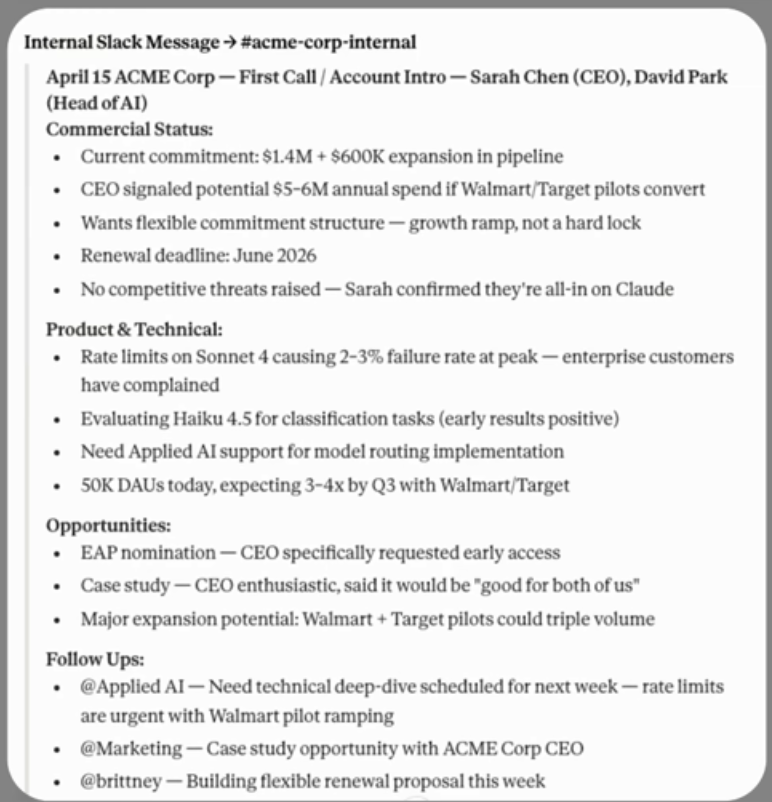
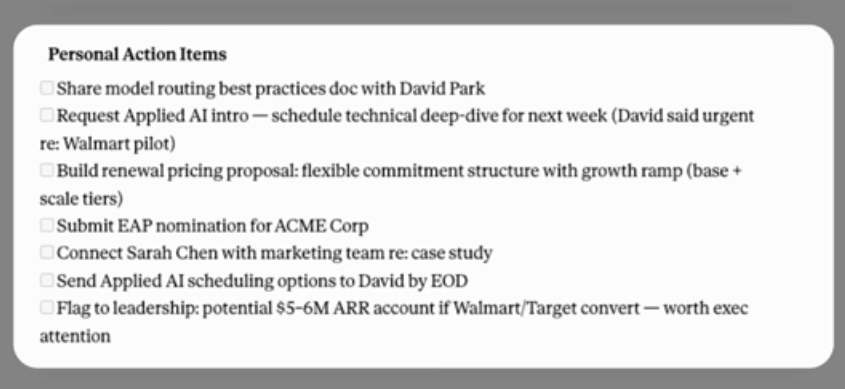
Claude fetches the call recording transcript and produces three things: personal action items for Brittney, an internal Slack message with key takeaways and assigned owners, and a customer follow-up message. Each one is more structured than what most people write from memory 10 minutes after hanging up.
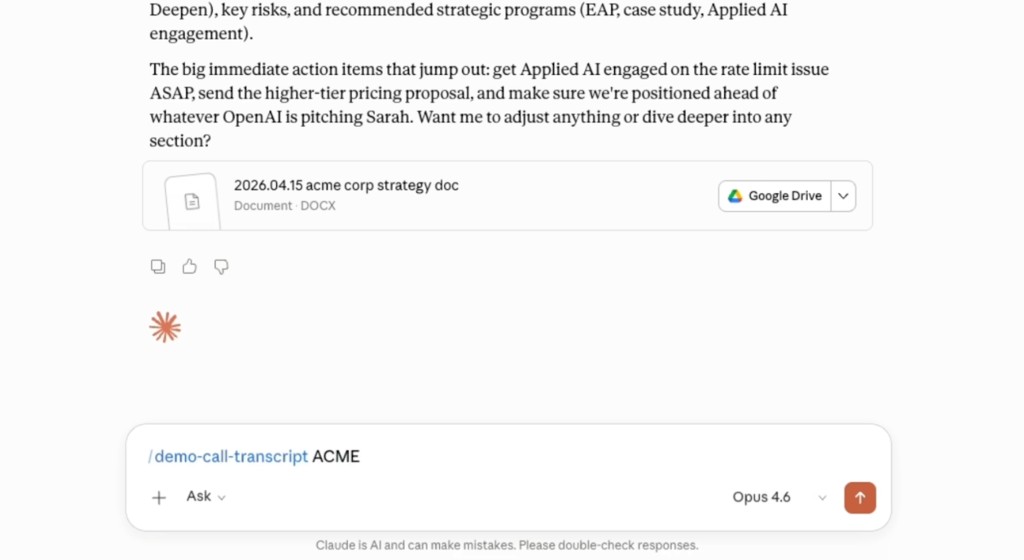
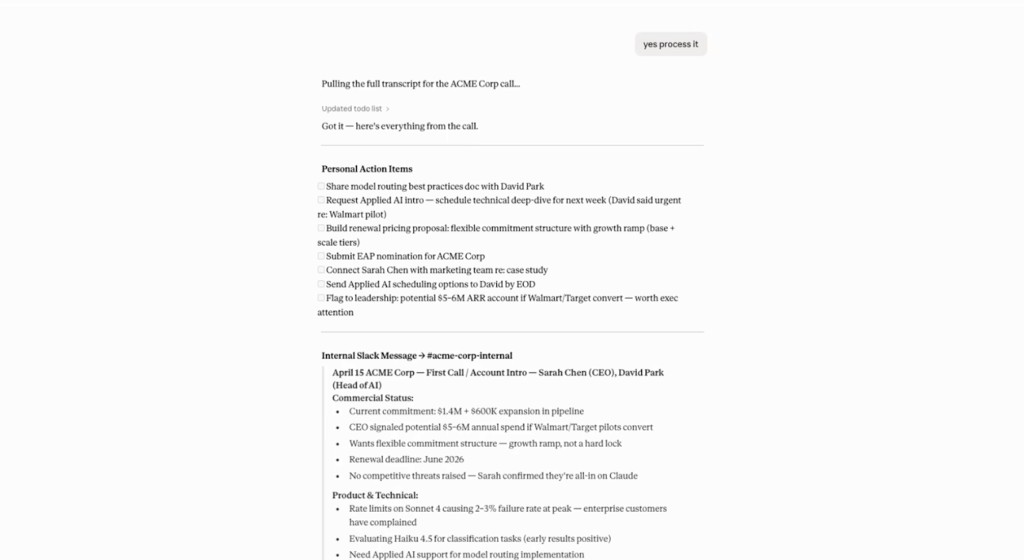
Step 9: Review and approve before anything sends.
This is the human-in-the-loop step Brittney calls out explicitly. Claude drafts the Slack message and holds it for her approval. She reads it, confirms it's accurate, then says "yes, send." Same for the customer follow-up. Nothing goes out automatically without her sign-off.
Step 10: Close the loop in minutes.
The post-meeting flow that used to take 30 minutes is done in a couple. Brittney has her action items, her team has the internal debrief, and the customer gets a thoughtful follow-up. All pulled from the same transcript, all formatted the way her team expects.
Starter prompt: Call Transcript Processor
Paste this into Claude Cowork. Update anything in brackets to match your stack, then ask Claude to turn it into a skill.
Please turn this into a reusable Cowork skill called "[call-transcript-processor]".

When I provide an account name after a sales call, do the following:

1. Pull the most recent call transcript for that account from [Gong / Chorus / Zoom / your call recording tool].

2. Generate three outputs:

   **Personal action items** — a checklist of specific tasks for [your name] with names, deadlines, and context from the call.

   **Internal Slack message** — formatted for [#account-name-internal / your internal channel naming pattern] with:
   - Meeting header (date, attendees, call type)
   - Commercial status (commitment, pipeline, renewal timeline, competitive landscape)
   - Product and technical (issues raised, evaluations in progress, support needs)
   - Opportunities ([EAP / beta programs / case studies / expansion signals relevant to your product])
   - Follow-ups with @mentions for each owner ([@Applied AI / @Marketing / your team's Slack handles])

   **Customer follow-up email** — professional, specific, references what we discussed, clear next steps. Send via [Gmail / Outlook / your email tool] only after I approve.

3. Show me each output for approval before sending anything.
   Do not post to [Slack / your team chat] or send email until I confirm.
What you can steal even without Anthropic's stack
Brittney works inside Anthropic, so she has native access to Salesforce, BigQuery, and internal Slack. You probably don't. That's fine. The pattern still works:
- Pre-meeting: One skill that pulls from whatever you have connected and outputs a brief you'd actually read before a call.
- Post-meeting: One skill that turns a transcript (or your rough notes) into action items, a team update, and a follow-up.
- Human approval: Always review before anything sends. The speed comes from drafting, not from autopilot.
Start with two accounts. Run the prep skill before your next call. Run the debrief skill right after. Refine the skill files until the output feels like something you wrote on a good day.
Additional Reading
Here are some related guides to check out:
Frequently asked questions
- How do sales reps use Claude to prep for calls?
- The pattern, from Anthropic AE Brittney Tong, is two Cowork skills: one that assembles a full account brief before a meeting by pulling from your CRM, call recordings, email, Slack, and the web, and one that turns the call transcript afterward into action items, an internal debrief, and a customer follow-up. Prep that used to take hours runs in minutes, and it's more thorough than what you'd write from memory. You review and approve everything before it sends.
- Can I build this if I don't work at Anthropic?
- Yes. The pattern works with whatever you have connected. Swap Salesforce and BigQuery for HubSpot, Notion, Gong, or even a spreadsheet export; the skill just pulls from the sources you point it at. Start with two accounts: run the prep skill before your next call and the debrief skill right after, then refine the skill files until the output feels like something you wrote on a good day.
- Will Claude send messages to customers on its own?
- No, the workflow keeps a human in the loop. Claude drafts the internal Slack debrief and the customer follow-up, then holds them for your approval; nothing goes out until you read it and say send. The speed comes from Claude doing the drafting and data assembly, not from autopilot.